Think11 Fantasy App KYC Verification India 2026: PAN, Penny Drop and Re-KYC Threshold
KYC on the Think11 fantasy app is the single biggest reason new accounts get stuck before they can withdraw. This is the full KYC flow Think11 runs in 2026: what PAN verification actually checks, how the penny-drop works, when Aadhaar gets triggered, and the Rs 1 lakh threshold that forces a full re-KYC under PMLA 2005.
By Think11 Editorial Desk · Updated · 12 min read · Fantasy Cricket App › KYC Guide
Compliance Notice: Think11 is a skill-based fantasy sports platform operating in India. This product is available only to users 18+ in permitted states. KYC is mandatory under the Prevention of Money Laundering Act (PMLA) 2005 and its 2024 amendments. Fantasy sports involve skill and strategy; outcomes depend on real-world match performance. Please play responsibly. Check local regulations before participating.
1. The four KYC levels Think11 enforces, and what each one unlocks
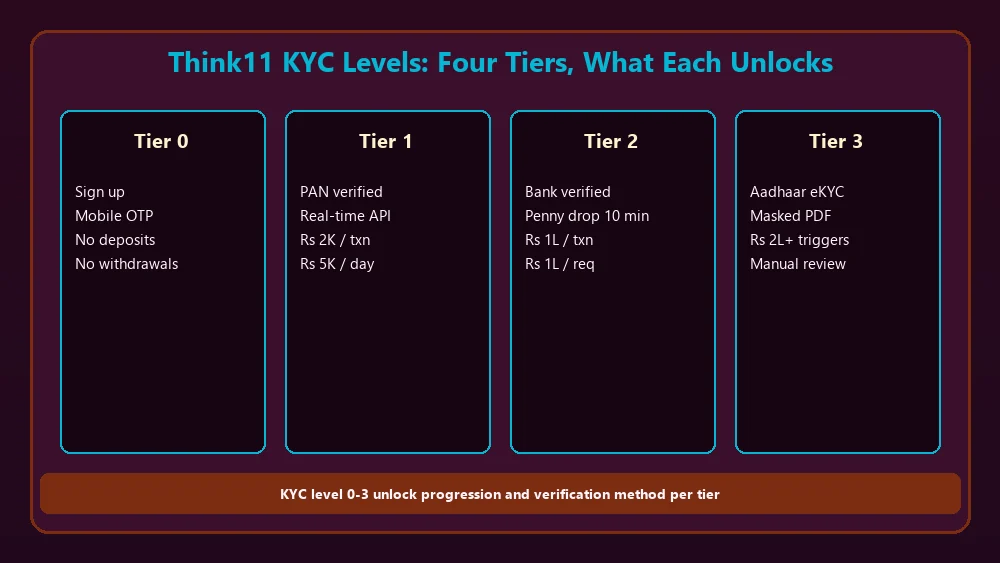
Think11 KYC levels: the four tiers, what each unlocks, and how long verification takes at each step.
Think11 runs KYC as a four-tier system, not a single yes/no check. Each tier unlocks a higher set of deposit and withdrawal limits, and each tier is enforced by a different verification method. Most new users hit tier 1 within minutes of sign-up and tier 2 within 10 minutes of their first deposit. Tiers 3 and 4 are only triggered by usage patterns (large withdrawals, account-age thresholds, or random periodic re-checks).
Tier 0 (signed up, mobile verified, no KYC done): you can browse contests, study player form, and build practice teams. You cannot deposit real money, cannot join paid contests, and cannot withdraw anything (you have no wallet balance). This tier is the only state where Aadhaar is not asked for at all.
Tier 1 (PAN verified): you can deposit up to Rs 2,000 per transaction and Rs 10,000 cumulative per month. Withdrawals are limited to Rs 5,000 per day. Verification: upload a PAN image, the app pings the income-tax database, real-time match. The 10-character PAN, the name on the PAN, and the date of birth on the PAN must all match what you entered during sign-up. Mismatches fail instantly.
Tier 2 (bank verified via penny drop): you can deposit up to Rs 1,00,000 per transaction and Rs 10,00,000 per month. Withdrawals up to Rs 1,00,000 per request. Verification: first UPI deposit triggers a Rs 1 credit-and-reversal cycle. Think11 records the bank account number from the reversal. Takes 10 minutes.
Tier 3 (full eKYC with Aadhaar or video KYC): triggered automatically when cumulative withdrawals cross Rs 2,00,000 in a financial year, or when PAN verification has failed twice and you have escalated to a manual review. You upload a masked Aadhaar PDF (only the last 4 digits visible) and complete a 30-second liveness selfie. Takes 2-6 hours during business hours.
Tier 4 (re-KYC under PMLA): mandatory when cumulative withdrawals cross Rs 1,00,000 in a financial year OR when a periodic re-KYC review flags an account. Full document re-upload, fresh selfie, recent bank statement, name-match confirmation. 24-48 hour processing. Without tier 4, withdrawals above the threshold freeze.
2. What PAN verification actually checks (and why most failures happen)
Think11 does not store your PAN image as a credential. The image is OCR-scanned, the extracted 10-character alphanumeric and name are sent to the income-tax department's PAN verification API, and the response is cached for 30 days. The cache means re-uploading the same PAN within 30 days skips the API call and uses the cached result. This is why a previously-working PAN can suddenly "fail" 31 days after sign-up if the underlying data on the income-tax side has changed (name correction, Aadhaar linking, PAN-Aadhaar link status change).
The four checks the PAN verification API returns. Check 1: PAN exists in the income-tax database. About 0.3% of PANs the app sees are invalid (mostly typos). Check 2: PAN holder's first name, middle name, last name match the name you entered during sign-up. The match is fuzzy (lowercase, trim whitespace) but it is strict on the surname. Check 3: PAN holder's date of birth matches the date of birth you entered. This is exact-match, not fuzzy. Check 4: PAN is not flagged as "inoperative" (a status that hits PANs that have not been linked to Aadhaar by the deadline).
The four most common failure modes. Failure 1 (60% of all PAN failures): date of birth on PAN does not match the date of birth you entered. The PAN card has the date of birth you gave when you applied for the PAN, which is sometimes different from the date of birth on your Aadhaar. If you used your Aadhaar date of birth during sign-up but your PAN has a different date of birth, the match fails. Fix: re-edit your sign-up date of birth to match the PAN, then re-upload the PAN. Takes 5 minutes.
Failure 2 (25%): uploaded PAN image is unreadable. The OCR step fails first, the app does not even attempt the API call. Common causes: image cropped at the edges (the 10-character PAN at the bottom is cut off), image taken at an angle (the OCR expects a flat top-down view), image has glare on the photograph, image is a screenshot of a digital PAN card (the digital PAN's font is not always OCR-friendly). Fix: re-take the photo with the PAN flat, well-lit, in focus, with all four edges visible.
Failure 3 (10%): PAN is "inoperative" because it has not been linked to Aadhaar. The income-tax department in 2023-2024 issued a series of deadlines for PAN-Aadhaar linking. PANs that missed the final deadline (March 31, 2024 for most users, with extensions for some categories) became inoperative. An inoperative PAN cannot be used for any financial transaction. Fix: link the PAN to Aadhaar on the income-tax e-filing portal first, wait 7 days for the link to propagate, then re-upload the PAN to Think11.
Failure 4 (5%): name mismatch between the PAN and the sign-up name. The fuzzy match allows for short names, missing middle names, and case differences, but it does not allow for a full name change (for example, post-marriage surname change). If you changed your surname on your PAN but the sign-up name is the new name, the match fails. Fix: update the sign-up name to match the PAN exactly, including the order of first/middle/last names.
Think11 reader guide: 3. The penny drop: how the first UPI deposit verifies your bank account
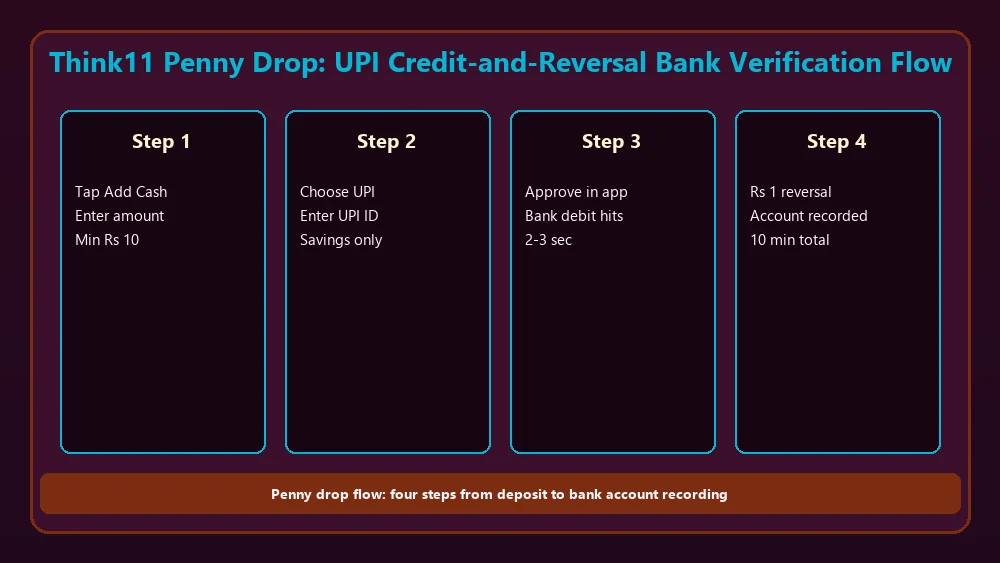
Penny drop flow: Rs 1 UPI credit-and-reversal that records the bank account number for KYC level 2.
The penny drop is the most reliable KYC step Think11 runs, and it is also the step most users never see happening because it is embedded in the first UPI deposit. The flow: you tap Add Cash, you enter an amount (Rs 10 minimum, no maximum for the first deposit), you choose UPI, you enter your UPI ID, you approve the collect request in your UPI app. The debit hits your bank, the credit hits your Think11 wallet, and somewhere in the middle, Think11 sent a Rs 1 UPI credit to your UPI handle, your bank reversed it, and the reversal record includes your bank account number and IFSC code.
Why a Rs 1 credit-and-reversal? The credit initiates a UPI transaction through the NPCI rails. The reversal is the bank's authoritative confirmation that the UPI handle is valid, the account is active, and the account holder name matches the UPI handle's name. The reversal record contains the account number, IFSC, and account holder name. Think11 reads the account number from the reversal, stores it as the verified bank account, and ignores the Rs 1 because the reversal means the money never moved net.
What the penny drop verifies. The bank account is real and active. The UPI handle's name matches the bank account holder name (this is the bank's own check, not Think11's). The UPI handle is on a savings or current account that supports IMPS credit (most do). The UPI handle has not been flagged for any compliance issue. The penny drop does NOT verify that the bank account holder is YOU. That link is established by PAN-name vs KYC-name match in the PAN verification step.
What fails the penny drop. Failure 1: the UPI handle is on a wallet like Paytm Wallet or Amazon Pay Balance. These are not bank accounts; they are prepaid instruments. The reversal flow does not return a bank account number. Think11 rejects the verification and asks you to use a UPI handle on a savings bank account. Failure 2: the UPI handle is on a joint account where you are the second holder. The penny drop succeeds (the joint account is real) but the KYC link between your PAN and the joint account holder name is not always established automatically. Think11 escalates to manual review in this case, which takes 4-6 hours.
Failure 3: the bank account is a NRE or NRO account (for NRIs). Think11 is currently only available to resident Indian users with Indian bank accounts, savings or current. NRE and NRO accounts are not supported. Failure 4: the UPI handle has been ported to a new bank in the last 7 days. UPI handles can move between banks, and the bank's UPI server takes a few days to sync the new account mapping. The penny drop may succeed but return the OLD bank's account number, which then fails the KYC link to your PAN.
4. When Aadhaar gets triggered (and the masked-upload approach Think11 uses)
Aadhaar is not a part of the standard Think11 KYC flow for most users. The two situations where it gets triggered. Trigger 1: PAN verification has failed twice in a row and you have escalated via the in-app support chat. Aadhaar acts as a fallback identity document, and the income-tax department accepts Aadhaar as a cross-reference for PAN issues. Trigger 2: cumulative withdrawals in a financial year cross Rs 2,00,000. At this point, PMLA 2005 (as amended in 2024) requires a second identity document, and Aadhaar is the default. Some users prefer to upload a video KYC (a 30-second liveness selfie with your PAN visible) instead of Aadhaar; both are accepted.
Think11 uses offline Aadhaar verification, which is different from the eKYC flow used by some banks and fintech apps. Offline verification means you download a masked Aadhaar PDF from the UIDAI portal (the PDF shows only your name, address, date of birth, photo, and the LAST 4 DIGITS of the Aadhaar number; the first 8 digits are masked as XXXX-XXXX), then upload that PDF to Think11. Think11's KYC vendor verifies the digital signature on the PDF against the UIDAI public key, confirms the PDF was issued by UIDAI, and reads the name, address, and date of birth. The full 12-digit Aadhaar number is never shared with Think11 or stored on the device.
Why offline Aadhaar instead of the standard eKYC flow. The eKYC flow requires the user to enter the 12-digit Aadhaar number and receive an OTP on the Aadhaar-linked mobile, which means the KYC vendor has access to the full Aadhaar number and the OTP. Offline Aadhaar keeps the KYC vendor at arm's length: they see only the masked PDF and the UIDAI signature, not the number itself. This is a deliberate privacy choice that aligns with the 2018 UIDAI circular restricting Aadhaar use by private entities.
What fails offline Aadhaar verification. Failure 1: the masked PDF is older than 30 days. UIDAI updates the Aadhaar PDF format occasionally, and an older PDF may use a deprecated signature format. Re-download from the UIDAI portal. Failure 2: the PDF is password-protected. UIDAI allows you to add a password to the downloaded PDF; Think11's KYC vendor cannot read password-protected PDFs. Remove the password before uploading (the PDF still contains the digital signature, so the password is just an extra layer you can safely remove for KYC purposes). Failure 3: the name on the Aadhaar does not match the name on the PAN. The fuzzy match here is stricter than the PAN-only check; even one missing character fails. Update either the PAN or the Aadhaar (the Aadhaar update is free at an Aadhaar Seva Kendra).
Think11 planning notes: 5. The Rs 1 lakh re-KYC threshold: when, why, and how to plan around it
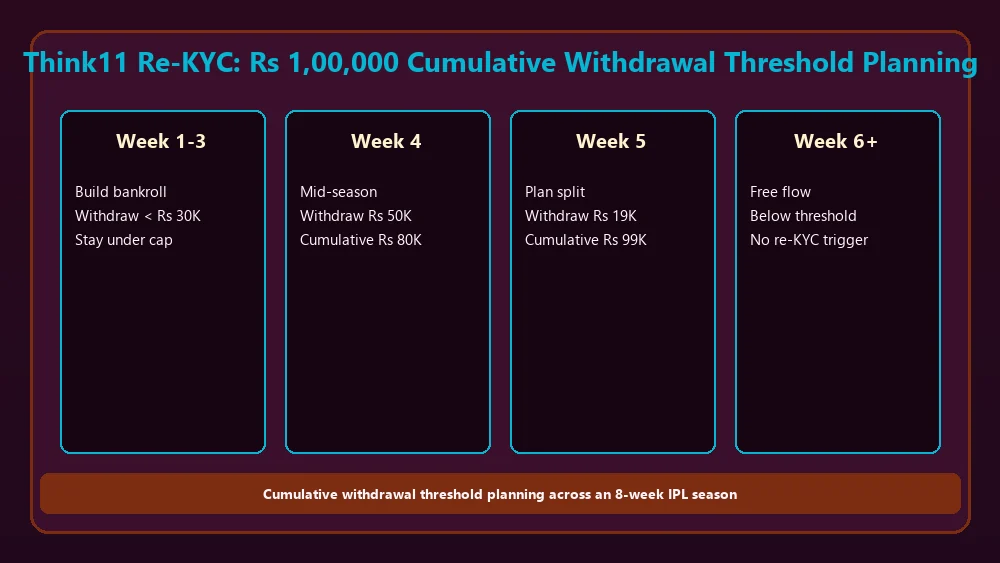
Re-KYC planning: the Rs 1,00,000 cumulative threshold and how to time your IPL-season withdrawals.
The Rs 1,00,000 cumulative withdrawal threshold is the single most disruptive KYC trigger for active fantasy players. Once your withdrawals in a financial year (April 1 to March 31) cross Rs 1,00,000, Think11 freezes the next withdrawal request and prompts for full re-KYC. The freeze is in place for 24-48 hours while the re-KYC documents are reviewed. During the freeze, you cannot withdraw, but you can still deposit and play.
Why the threshold exists. PMLA 2005 requires "enhanced due diligence" for high-value accounts, defined as accounts with cumulative transactions above a threshold set by the Ministry of Finance. The Ministry set the threshold at Rs 1,00,000 cumulative withdrawals per financial year for skill-based gaming platforms in the 2024 amendments. The threshold is per user, not per operator, and Think11 tracks it internally across your full account history. Switching from Think11 to a competitor does not reset the threshold; if you come back next season, Think11 still tracks the cumulative total.
How to plan around the threshold for IPL 2026. The IPL runs about 8 weeks (late March to late May). If you are a moderate-volume player (Rs 2,000-Rs 5,000 weekly withdrawals), the Rs 1 lakh threshold hits around week 6 of the IPL, mid-playoffs. The disruption to your cash flow is significant. Two strategies work. Strategy 1: split your withdrawals before the threshold. Withdraw Rs 50,000 in week 4, withdraw another Rs 49,000 in week 5, stay below the threshold. The re-KYC is then not triggered until the next financial year or until cumulative withdrawals hit Rs 1,00,000 again. Strategy 2: trigger the re-KYC early in the season, complete it during a low-stakes week, and then withdraw freely for the rest of the season. The re-KYC is a 24-48 hour process, and once cleared, the threshold is reset for the financial year.
The re-KYC itself is straightforward but takes time. Step 1: take a fresh liveness selfie (the app uses the front camera, you blink and turn your head, takes 15 seconds). Step 2: upload a fresh PAN image (any clear photo, OCR will run again). Step 3: upload a recent bank statement (PDF or photo of a printed statement, must show the last 30 days of transactions and the account holder name). Step 4: confirm the name-match between PAN and bank account. The KYC review team processes the documents in 24-48 hours, and the wallet unfreezes automatically once approved.
6. KYC and bonus interactions: why the THINK11100 bonus does not bypass KYC
A common misconception is that the THINK11100 welcome bonus is "free" and therefore not subject to KYC. It is not. The welcome bonus unlocks at tier 1 KYC (PAN verified), but the winnings from the bonus-funded contests are still real money and are subject to full KYC level 2 before they can be withdrawn. Think11's flow: you sign up, verify PAN, deposit Rs 100 or more, get the Rs 100 bonus, play 50 free contests with the bonus, win some amount, request a withdrawal of the winnings. The withdrawal request triggers the bank verification (penny drop) on the spot, even if you have not done a deposit yet. The penny drop is tied to the UPI handle you used for the deposit, so the withdrawal verification is automatic.
Another misconception: the bonus is treated as KYC-exempt money. It is not. The bonus is a liability on Think11's books; the winnings are also a liability until paid out. Both are subject to PMLA's "enhanced due diligence" rules, which means both require tier 2 KYC. The only difference is that the bonus does not count toward the Rs 1,00,000 cumulative threshold (only withdrawals count toward the threshold), but the KYC requirement to withdraw the bonus winnings is the same as withdrawing deposit-derived winnings.
7. The 4-step KYC preparation checklist for new Think11 users
Walk through this list before you sign up, to avoid the most common KYC delays.
Step 1: have your PAN card ready. The PAN must be linked to Aadhaar (otherwise it is inoperative as of 2024). The PAN must be in your own name, with the date of birth matching the date of birth you will enter during sign-up. The PAN image must be a flat top-down photo with all four edges visible and no glare on the photograph.
Step 2: have a UPI handle ready on a savings bank account in your own name. Credit card UPI and wallet UPI (Paytm Wallet, Amazon Pay Balance) will not work. Joint accounts where you are the second holder will not work. The mobile number linked to the UPI handle should be the same mobile number you will use for the Think11 sign-up.
Step 3: have a recent bank statement ready (PDF or photo). You will need this for the tier 4 re-KYC if your cumulative withdrawals cross Rs 1,00,000. The statement must show the last 30 days of transactions and the account holder name matching the PAN name. Most banks let you download a 30-day statement from the net-banking portal in 2 minutes.
Step 4: have a stable email address. Think11 sends KYC status updates, re-KYC reminders, and the 7-day pre-threshold notice to your registered email. The email address does not need to match anything else, but it should be one you check regularly during the IPL season.
Think11 fantasy app: 8. What to do if your KYC has been stuck for more than 24 hours
The standard KYC processing times are: tier 1 (PAN) under 60 seconds, tier 2 (penny drop) 10 minutes, tier 3 (Aadhaar) 2-6 hours, tier 4 (re-KYC) 24-48 hours. If your KYC has been stuck for more than the standard time, the in-app support chat is the fastest escalation path. Include: your registered mobile number, the KYC tier you are stuck on, the exact error message (or a screenshot), and the time the KYC was initiated.
Common KYC-stuck scenarios and fixes. Stuck on tier 1 for more than 5 minutes: the PAN API call may have timed out. Re-upload the PAN. If it fails again, switch to the manual review flow via support. Stuck on tier 2 for more than 30 minutes: the penny drop may not have triggered. Make a small deposit (Rs 10 is the minimum) to force the penny drop. If the deposit succeeds but the penny drop does not, contact support with the UPI reference number.
Stuck on tier 3 for more than 6 hours: the masked Aadhaar PDF may have a digital signature issue. Re-download the PDF from the UIDAI portal, verify the PDF opens without a password, and re-upload. Stuck on tier 4 for more than 48 hours: the re-KYC documents may be incomplete. The most common missing document is a clear bank statement showing the last 30 days; a photo of a passbook front page is not sufficient. Re-upload a full statement.
9. KYC for users in restricted states and union territories
Think11 is not available in Andhra Pradesh, Telangana, Odisha, Assam, Sikkim, Nagaland, and a small set of union territories where skill-based fantasy sports are restricted or require additional licensing. The KYC flow blocks sign-ups from these geographies at the mobile number verification step. If you are a resident of a permitted state but are temporarily in a restricted state, you can still play; the KYC is tied to the mobile number and PAN, not the current GPS location. The reverse is not true: if your PAN is registered to a restricted state, you cannot sign up even from a permitted state.
For users in Tamil Nadu and Karnataka, the regulatory environment is in flux as of 2026. Think11 operates in both states but with additional disclosure requirements: every contest entry shows a "skill-based gaming" disclosure, and the welcome screen shows a state-specific responsible-play message. KYC is the same as in other permitted states. For users in Kerala, where the public gaming ban has been challenged in court multiple times, Think11 currently does not operate; the KYC flow blocks sign-ups from Kerala mobile numbers and Kerala-registered PANs.
10. Comparing KYC on Think11 with the broader fantasy app industry in India
All major fantasy cricket apps in India (Dream11, MyTeam11, Gamezy, Vision11, My11Circle, Think11) follow the same PMLA-driven KYC framework. The differences are in execution speed and the specific tier triggers. Think11's tier 1 PAN verification completes in under 60 seconds, which is faster than the industry average of 2-5 minutes. Think11's tier 2 penny drop completes in 10 minutes, faster than the 30-60 minute industry average. The tier 4 re-KYC processing time is 24-48 hours, which is in line with the industry average of 24-72 hours.
Where Think11 stands out: the masked Aadhaar approach (offline Aadhaar PDF) is more privacy-friendly than the standard eKYC flow used by some competitors. The 7-day pre-threshold notice for the Rs 1 lakh re-KYC is more user-friendly than competitors who freeze the account without notice. The Rs 10 minimum deposit for triggering the penny drop is lower than competitors who require Rs 100 or more, which makes it easier for casual players to verify their bank account early.
For a broader comparison of KYC flows across 6 fantasy apps, including which apps trigger Aadhaar at lower thresholds and which apps reset the threshold on operator change, see the Think11 fantasy app review hub. For the deposit-and-withdrawal speed comparison that follows directly from KYC level, see the /comparisons/ hub for operator-by-operator benchmarks.
11. Responsible play: setting your own KYC-related safety guards
KYC is a regulatory requirement, not a personal choice, but the KYC level you operate at is partly within your control. Most players stay at tier 2 (PAN + bank verified) for the entire season, which is sufficient for any reasonable fantasy activity. Triggering tier 4 re-KYC mid-season is a disruption you want to avoid unless your cumulative winnings justify the hassle. The single most useful guard: set a per-week withdrawal cap in the wallet screen (Profile > Responsible Play > Withdrawal Limits) that keeps your cumulative withdrawals below Rs 1,00,000 for the season. This is the easiest way to avoid the re-KYC disruption entirely.
Think11's responsible play settings also include deposit limits, contest entry caps, and a self-exclusion window (24 hours to 6 weeks). The settings take effect immediately and can only be relaxed after a 7-day cooling-off period, which is intentional friction to slow down impulsive changes. For users who want a broader responsible-play framework across multiple operators, the /responsible-play/ hub covers session-length guard rails, deposit-cycle warnings, and the registered self-exclusion databases in India.
If you are reading this because your KYC has been stuck and you are considering depositing more money to "unstick" it, pause. The deposit will not unstick the KYC. The KYC flow is independent of deposit activity. The pause button is the most valuable button on any fantasy app. The deposit button will be there in 30 minutes, after a walk, after a meal, after a conversation with someone you trust.